If you receive an error message, the description of which contains information that sending to the specified number can lead to a loop in sending SMS, then read this article.
The fact is that not all users understand how to use the application and when setting up the filter they can specify their own phone number (the number of the phone on which this application is installed). In fact, you do not need to indicate the phone number of the SMS from which you want to send somewhere, you need to indicate where you want to send those SMS that come to the phone on which the application is installed (while in the application you do not need to specify this anywhere number, it will already have access to the SMS of the phone on which it is installed).
In case the user has indicated his own phone number, the application will send SMS to him, this SMS will be sent to the phone, the application will see information about new SMS and send them again. Thus, in a short period of time, a huge amount of SMS will be sent and the mobile operator will then ask to pay for it.
To prevent such errors, protection has been added to the application, if the application notices a suspicious sending, then this error will come and SMS will not be sent to avoid unnecessary spending.
If you are sure that you have configured the application correctly and do not send SMS to yourself, or in some cases users use the application as an answering machine, then you can remove the protection by disabling the option in the forwarding purpose settings:
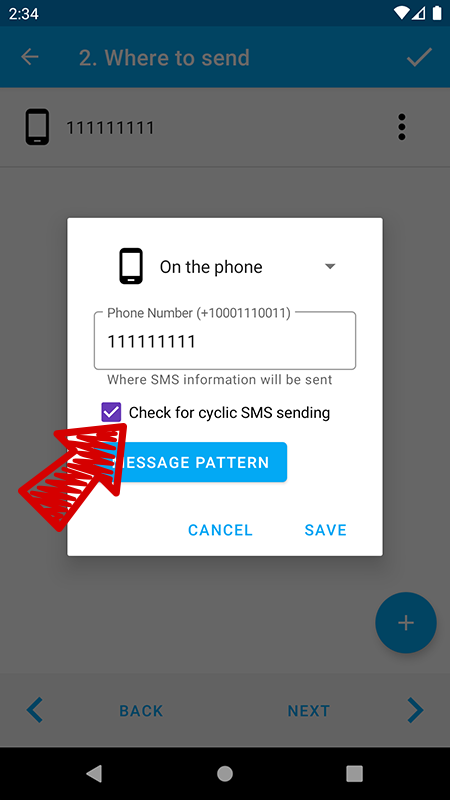
In this case, the protection will not be triggered, but make sure that an endless loop does not occur, because the application is executing its algorithm and cannot know about the loops.